Is your key fob acting up or completely unresponsive? Most often, the culprit is a dead battery.
But don’t worry—you don’t need to rush to a dealership or mechanic to fix this. You can easily change the battery in your key fob yourself, saving time and money. In this guide, you’ll discover simple, step-by-step instructions to open your key fob, replace the battery, and get it working like new again.
Ready to take control and avoid the hassle of being locked out? Keep reading, and you’ll be a key fob battery pro in no time.

Credit: www.bankstreet-toyota.ca
Locate The Key Fob Opening
Opening the key fob case is the first step to replace its battery. Most key fobs are designed to be easy to open without damage. The case usually snaps together and hides the battery inside. You need to be careful to avoid breaking any parts during this process.
Look closely at your key fob. You will see a small notch or a seam where the two halves meet. This is where you can pry the case apart. Using the correct tool and gentle force will make this step simple and safe.
Select The Right Tool
Choose a small flathead screwdriver, a coin, or a plastic pry tool. These tools fit well in the notch and provide good leverage. Avoid using sharp or large tools that can damage the case. A plastic pry tool is often the safest choice for delicate key fobs.
Gently Pry Apart The Halves
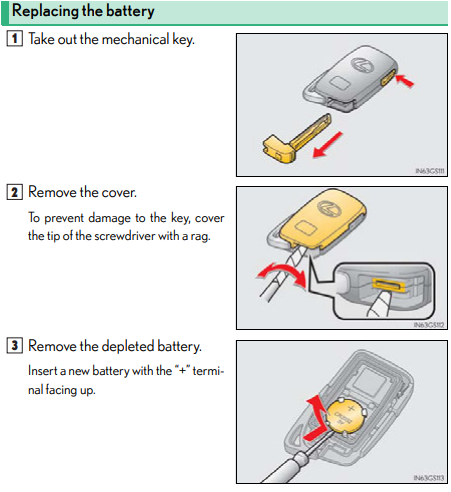
Insert your chosen tool into the notch or seam carefully. Twist or lift the tool slowly to separate the two halves. Do not force it. If you feel resistance, adjust the tool or try a different angle. The case should pop open with gentle pressure.
Once open, keep the halves apart to find the battery inside. Take note of how the pieces fit together for easy reassembly later.
Credit: northparklexusatdominion.com
Open The Key Fob Case
Identifying the correct battery orientation is vital when changing your key fob battery. Placing the new battery incorrectly can prevent the fob from working. Take time to check how the old battery sits inside the key fob. This step ensures your key fob will function properly after replacement.
Observe Positive And Negative Sides
Remove the old battery carefully. Look for the plus (+) and minus (-) signs on the battery. The positive side usually faces up and may have numbers or letters. The negative side often has a flat or plain surface. Note which side faces the top inside the key fob. This guides the placement of the new battery.
Note Battery Model Number
Check the number printed on the battery’s surface. This number tells you the exact battery type. Writing down the model number helps buy the right replacement. Using the wrong battery size or type can damage the key fob. Always double-check the model before purchasing a new battery.
Identify Battery Orientation
Changing the battery in your key fob requires a few simple tools and supplies. Having the right items ready makes the process quick and easy. This section covers the basic tools and the types of replacement batteries you need. Preparing these beforehand helps avoid any delays.
Small Flathead Screwdriver Or Coin
A small flathead screwdriver is ideal for opening the key fob case. It fits into the small notch or seam and helps pry the two halves apart without damage. If you don’t have a screwdriver, a coin works well too. It provides enough leverage to open the fob gently. Avoid using sharp or large tools to prevent scratches or breaks.
Replacement Battery Types
Key fob batteries come in different types and sizes. The most common type is the CR2032 coin battery, but some fobs use CR2025 or CR2016. Check the old battery for the number printed on it before buying a new one. Using the exact battery type ensures your key fob works correctly. You can find replacement batteries at auto parts stores or online retailers.

Credit: www.performancechryslerjeepcenterville.com
Frequently Asked Questions
Can I Change The Battery In My Key Fob Myself?
Yes, you can change your key fob battery yourself. Use a small tool to open the fob, replace the battery correctly, and snap it back securely. Test all functions after replacement to ensure it works properly.
How Do I Open A Key Fob Case?
Locate the notch or seam on the key fob. Insert a coin or small flathead screwdriver. Gently twist to pry open the case. Remove the old battery, noting its orientation. Insert the new battery the same way, then snap the case back together.
Test the key fob.
How To Start Your Car If Your Key Fob Battery Dies?
Press the key fob’s mechanical key release. Use the mechanical key to unlock the door. Hold the fob near the start button and press it to start the car. Replace the key fob battery soon to restore full function.
What Kind Of Battery Goes In My Key Fob?
Most key fobs use CR2032 or CR2025 lithium coin batteries. Check your fob or manual for the exact type. Replace with the same model for proper function.
Conclusion
Changing your key fob battery is simple and quick. Just follow the steps carefully. Use the right tools and handle the battery with care. Make sure to insert the new battery in the same way as the old one. Test your key fob after replacing the battery to ensure it works well.
Doing it yourself saves time and money. Now, you can keep your key fob working smoothly without any hassle.