Replacing your car battery doesn’t have to mean losing all your saved settings—like your radio presets, clock, or even engine computer data. If you’ve ever swapped a battery and ended up frustrated resetting everything, you’re not alone.
But here’s the good news: with the right approach, you can keep your car’s memory intact while giving it a fresh boost of power. In this guide, you’ll learn simple, step-by-step tricks to replace your battery without wiping out your settings.
Ready to save time and avoid hassle? Let’s dive in and make this quick fix easy and stress-free for you.
Credit: swiftbatteryspecialist.sg
Tools And Materials Needed
Before replacing your car battery without losing your settings, gather all necessary tools and materials. Proper preparation helps protect your vehicle’s memory and makes the process smooth. You need both memory saver devices and basic hand tools. These items ensure you keep your radio presets, clock, and other settings intact.
Memory Saver Options
Memory savers provide power to your car’s computer during battery replacement. One common option is a plug-in memory saver that connects to the vehicle’s OBD-II port. Another is a 9-volt battery memory saver that plugs into the cigarette lighter socket. Some use a second battery or a trickle charger connected with jumper cables. These tools maintain voltage and prevent loss of settings. Choose a memory saver compatible with your car model for best results.
Basic Tools Checklist
Prepare these basic tools for the battery swap:
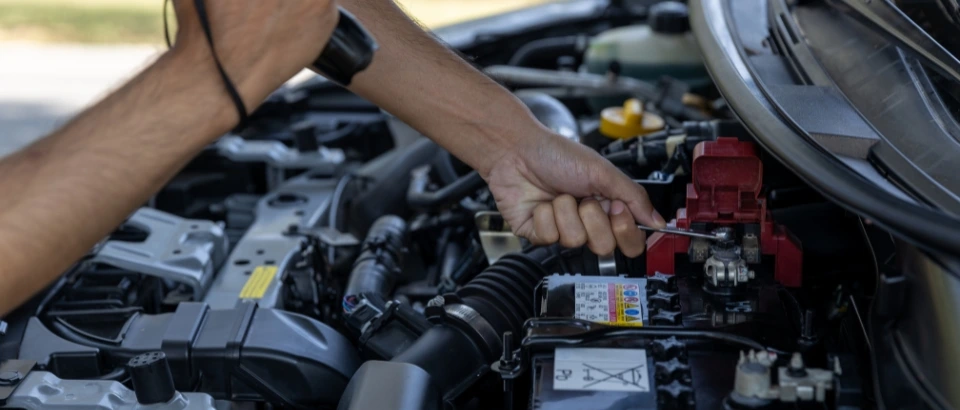
- Wrench or socket set (usually 10mm) to remove battery terminals
- Battery terminal puller (optional but helpful)
- Gloves to protect your hands
- Safety glasses for eye protection
- Battery cleaning brush or wire brush to clean terminals
- Rags or paper towels to wipe spills or corrosion
- New battery that fits your vehicle specifications
Having these tools ready reduces hassle and keeps the process safe. Use the correct size wrench to avoid damage. Wear gloves and glasses for safety. Clean terminals before installing the new battery to ensure good contact and prevent future issues.
Preparing Your Car
Preparing your car properly helps keep your settings safe during battery replacement. Follow these steps carefully. They protect your radio presets, clock, and other settings.
Start with simple actions that keep power flowing to your car’s memory. This prevents loss of important data stored in your car’s computer system.
Set Ignition To Accessory
Turn the car key to the “accessory” position. This turns on power to electronics but does not start the engine. The dashboard lights will come on.
This step allows a memory saver device to keep your settings alive. Do not turn the ignition off until the battery is fully replaced.
Locate Battery And Terminals
Open your car’s hood and find the battery. It is usually near the front on either side. Look for a rectangular box with two cable connections.
Identify the battery terminals. The positive terminal usually has a red cover or a plus (+) sign. The negative terminal has a black cover or a minus (–) sign.
Make sure both terminals are clean and free of corrosion. This helps with easy removal and installation of the new battery.
Using A Memory Saver
Using a memory saver is the best way to keep your car’s settings safe. It powers the car’s computer during battery replacement. This stops the loss of radio presets, clock settings, and other saved data. Memory savers work by connecting to the car’s OBD-II port or cigarette lighter socket.
These small devices provide constant power. They make battery replacement easier and stress-free. Anyone can use a memory saver with some simple steps. Let’s explore how to connect and verify it properly.
Connect The Memory Saver
First, find the OBD-II port under your dashboard. It is usually near the steering wheel. Plug the memory saver into this port carefully. If your car has no OBD-II port, use the cigarette lighter adapter. Make sure the car ignition is off before connecting.
Next, turn on the memory saver device. This will supply power to your car’s computer. Now you can safely remove the old battery. Remember to disconnect the negative terminal first. Then remove the positive terminal. This order helps avoid sparks.
After removing the old battery, place the new one in its spot. Secure the battery properly. Reconnect the positive terminal first, then the negative. Keep the memory saver connected until all cables are tight. This ensures continuous power to the computer.
Verify Power Connection
Check that the memory saver device is powered on. Most models have a light or indicator for this. If the light is off, check your connections. Make sure the memory saver is plugged in firmly.
Turn the car ignition to the accessory mode. This turns on the dashboard lights without starting the engine. If the radio and clock still work, the memory saver is functioning well. This means your car’s settings are safe.
Keep the memory saver connected until you finish installing the battery. Only disconnect it after confirming the car settings remain intact. This extra step protects your saved data from resetting.
Removing The Old Battery
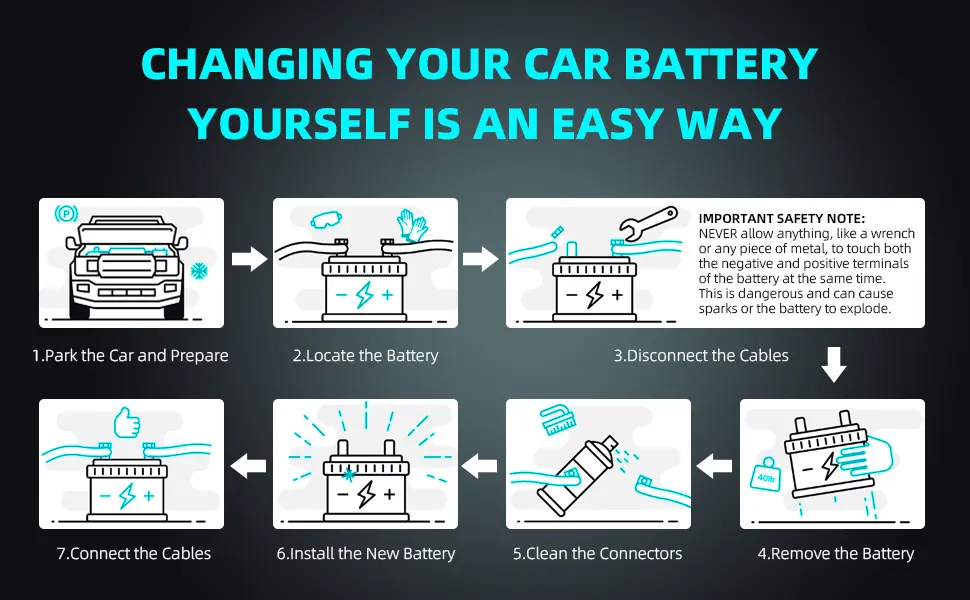
Removing the old battery is the first step to replacing your car battery. It requires care to avoid damage and keep your car settings intact. Follow the right order and use proper tools. This ensures safety and protects your vehicle’s memory.
Disconnect Negative Terminal
Start by locating the negative terminal. It usually has a black cable and a minus (-) sign. Use a wrench to loosen the bolt. Remove the negative cable carefully and keep it away from metal parts. This step stops electrical flow and prevents sparks.
Disconnect Positive Terminal
Next, find the positive terminal. It has a red cable and a plus (+) sign. Loosen the bolt with a wrench. Remove the positive cable gently. Avoid touching both terminals at the same time. This prevents short circuits and protects your car’s electronic settings.
Remove Battery Safely
Check for any clamps or brackets holding the battery in place. Use the right tools to remove them. Lift the battery straight up using both hands. Car batteries are heavy and contain acid, so handle with care. Place the old battery on a flat, stable surface for recycling.
Installing The New Battery
Keep your car settings by using a memory saver or a trickle charger during battery replacement. Connect power before removing the old battery to maintain memory. Install the new battery carefully, reconnect terminals in the correct order, then disconnect the saver to keep your settings intact.
Installing the new battery is the final step to complete your replacement. Handle the battery carefully to avoid damage or spills. Follow the correct order for reconnecting terminals to keep your car settings intact. This process helps maintain memory in your car’s computer and radio.
Place And Secure Battery
Carefully lift the new battery and place it in the tray. Make sure it fits snugly without moving. Use the battery hold-down clamp or bracket to secure it tightly. A secure battery prevents vibrations that can cause connection issues or damage.
Reconnect Positive Terminal
Attach the positive (red) terminal cable to the positive battery post. Tighten the terminal clamp firmly but do not over-tighten. This connection powers your car’s electrical system first. Check for a solid and clean connection to avoid power loss.
Reconnect Negative Terminal
Attach the negative (black) terminal cable to the negative battery post. Tighten the terminal clamp securely to complete the circuit. Always connect the negative terminal last to reduce sparks. A good connection helps preserve your car’s saved settings and systems.
Disconnecting The Memory Saver
Disconnecting the memory saver is a key step in replacing your car battery without losing settings. This device keeps your car’s memory active during the battery change. It prevents loss of radio presets, clock settings, and other electronic data.
Using a memory saver protects your car’s computer and avoids frustrating resets. Learning how to disconnect it correctly helps you save time and avoid errors. Follow these simple steps to handle the memory saver safely.
Turn Off Ignition
Make sure the car ignition is completely off. Remove the key from the ignition slot. This stops power flow and protects the car’s electronics. Never disconnect the battery while the ignition is on. Turning off the ignition prevents sparks and damage.
Unplug Memory Saver
Locate the memory saver device connected to your car’s power. It usually plugs into the cigarette lighter or OBD-II port. Gently unplug the memory saver from the socket. Avoid pulling the cord forcefully to prevent damage. Keep the memory saver aside until you finish replacing the battery.
Alternative Method With Trickle Charger
The alternative method with a trickle charger helps keep your car’s settings intact. It supplies a small, steady power flow during battery replacement. This prevents your car’s memory, radio presets, and other settings from resetting. Using this method is simple and safe with the right steps.
Set Up Trickle Charger Or Second Battery
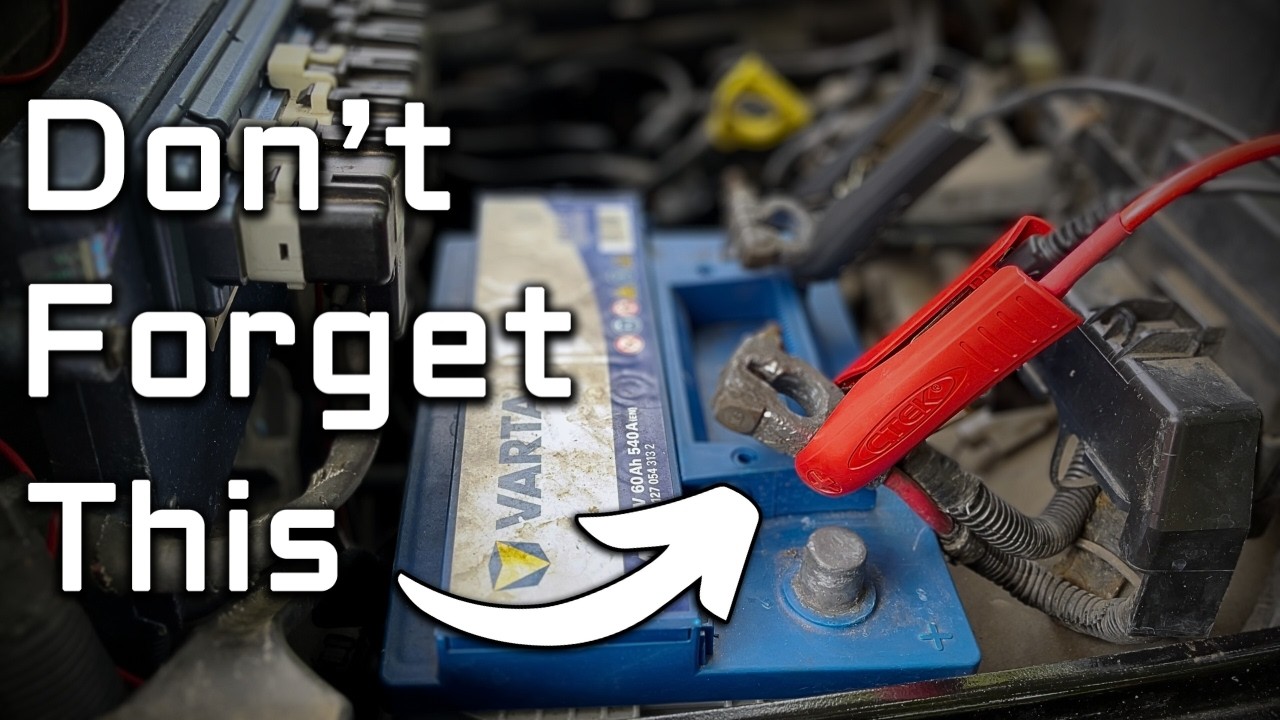
Connect the trickle charger or a second battery to the old battery terminals. Attach positive to positive and negative to negative. Make sure the connections are secure and correct. This setup provides continuous power to your car’s electrical system.
Follow Battery Removal And Installation Steps
Turn off the ignition but keep the trickle charger connected. Remove the negative cable from the old battery first. Then, remove the positive cable carefully. Take out the old battery and place the new one. Connect the positive cable first, then the negative cable.
Remove Power Source Safely
Once the new battery is installed and cables are tight, disconnect the trickle charger or second battery. Remove the negative connection first, then the positive. Make sure all connections are secure on the new battery. Your car’s settings should remain saved without any resets.
Safety Tips
Replacing a car battery without losing your settings requires care and attention. Safety is a top priority during this process. Follow these safety tips to protect yourself and your vehicle. Proper handling of battery terminals and avoiding electrical shorts are essential steps. Knowing when to seek professional help keeps the replacement safe and smooth.
Handle Terminals Carefully
Always wear gloves and eye protection. Battery terminals carry electric current that can cause sparks. Disconnect the negative terminal first to reduce shock risk. Avoid touching both terminals with metal tools. Keep the terminals clean and dry before reconnecting. Secure the connections tightly to prevent loose contact.
Avoid Short Circuits
Never let metal objects touch the battery terminals. A short circuit can create sparks or damage the car’s electrical system. Remove jewelry like rings or watches before starting. Work in a dry area to prevent moisture from causing shorts. Use insulated tools designed for automotive work. Double-check connections before powering the battery.
When To Visit A Dealer
Visit a dealer if unsure about the battery type or replacement steps. Modern cars have complex electronics that need special care. Some vehicles require a memory saver tool to keep settings. Dealers have tools to reset the car’s computer safely. Choose professional help for hybrid or electric cars. Avoid risks by trusting expert technicians.
Troubleshooting Common Issues
Troubleshooting common issues after replacing a car battery helps keep your settings intact. Some problems may arise even with careful steps. Knowing how to fix these issues saves time and frustration. This section covers two frequent problems and their solutions. Follow these tips to maintain your car’s memory and function properly.
Settings Still Reset
Settings may reset if the memory saver disconnects too soon. Keep the memory saver connected until the new battery is fully installed. Check all connections are secure and clean. Weak or loose cables can cause power loss. Use a multimeter to confirm continuous voltage to the car’s computer. If settings still reset, try using a trickle charger or a second battery as a backup power source.
Battery Not Holding Charge
A new battery may fail to hold charge due to poor installation. Ensure terminals are tight and free of corrosion. Test the battery with a voltmeter after installation. Check the alternator output, as it charges the battery while driving. A faulty alternator can drain the battery quickly. Replace any worn cables or fuses that may cause power loss. Proper installation and a healthy charging system keep your battery reliable.
Credit: www.leoch.com
Credit: www.youtube.com
Frequently Asked Questions
How Do You Change A Car Battery Without Losing Presets?
Connect a memory saver or trickle charger to the battery terminals. Turn ignition to accessory mode. Disconnect old battery (negative first), install new one (positive first). Reconnect the saver. This keeps presets intact by maintaining continuous power during the swap.
How Not To Lose Memory When Changing Car Battery?
Use a memory saver or connect a trickle charger to maintain power during battery replacement. Disconnect the negative terminal first, then positive. Install the new battery, reconnect positive first, then negative. Remove the saver; your settings will stay intact.
How To Reset Car Computer After Replacing Battery?
To reset the car computer after battery replacement, disconnect the negative terminal first. Reconnect the battery terminals positive first, then negative. Turn the ignition on for a few minutes to let the system recalibrate. Use a memory saver during replacement to preserve settings and avoid resets.
Will I Lose My Data If I Replace My Battery?
You won’t lose your data if you use a memory saver or connect a trickle charger during battery replacement. Always disconnect the negative terminal first and reconnect it last to protect your settings. This keeps your car’s computer and presets intact while changing the battery.
Conclusion
Replacing a car battery without losing your settings is simple with the right steps. Always keep a power source connected during the swap. This keeps your car’s memory alive. Remember to remove and attach cables in the correct order. Take safety precautions to avoid damage.
Following these tips saves time and hassle. Your car will start with all settings intact. Try these easy methods next time you change your battery. No need to worry about losing radio presets or clock times again.